 Graham Ottley
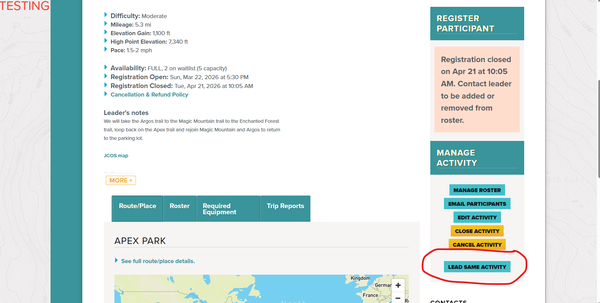
FOR CMC LEADERS - Website Update: New Tools for Leaders
Three improvements to help you manage activities, review rosters, and find trips faster
May 2026 | CMC Education & Technology
The CMC website has received three targeted updates that directly affect how you lead and manage activities. Whether you're setting up a new trip, reviewing who's applied, or helping a co-leader post their own version of a popular outing, these changes are designed to save you time and reduce confusion.
1. Map View for Trip Search
Members and leaders searching for trips can now toggle between the standard list view and a new interactive map view. After filtering by activity type, click the Map button in the upper right of the search results to see all matching trips plotted by location across Colorado.
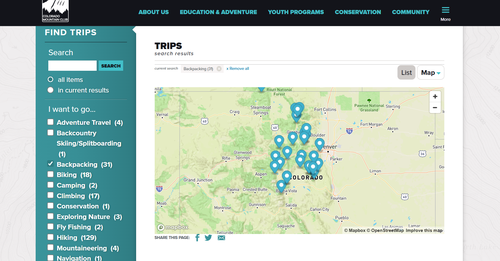
Map view showing backpacking trips across Colorado. Use the List / Map toggle in the upper right to switch views.
Click any pin to see a pop-up summary with trip name, date, leader, availability, and registration status — including how many participant and leader spots remain.
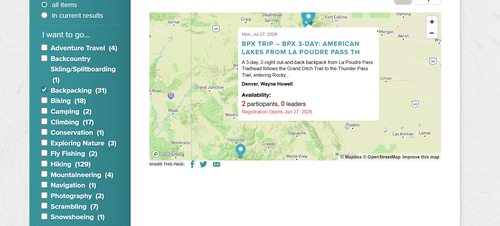
Clicking a map pin reveals trip details, registration status, and opens directly to the full listing.
Why it matters for leaders: Use map view to quickly see geographic gaps in your section's programming, or to help members find outings near a specific trailhead or region.
2. Lead Same Activity Button
Leaders can now duplicate an existing activity they've led before with a single click. On any activity you're listed as a leader, look for the new Lead Same Activity button in your Manage Activity panel on the right side of the activity page.
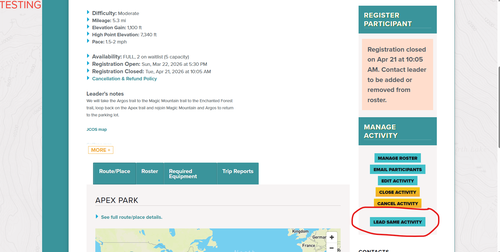
The new 'Lead Same Activity' button appears in the Manage Activity panel for leaders. Look for it below Close Activity and Cancel Activity.
Clicking Lead Same Activity creates a new draft activity pre-populated with the same route, description, difficulty, equipment list, and leader notes — saving significant setup time for recurring trips. You'll still need to set a new date and open registration before publishing.
Tip: This is especially useful for section staples — annual hikes, regular conditioning trips, or training outings you lead multiple times a season.
3. Applied Status with Leader Approval
A new registration workflow now gives leaders more control over who joins their trips. When a trip is set up with leader approval required, participants who sign up enter an Applied status rather than going directly onto the registered roster.
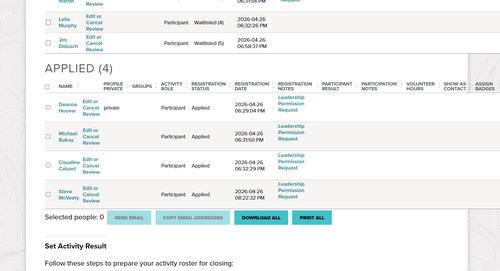
The roster now displays an Applied section separately from the Registered and Waitlisted sections, with a Leadership Permission Request link next to each applicant.
As a leader, you'll see an Applied section on your roster, separate from the Registered and Waitlisted sections. Each applicant will have a Leadership Permission Request link you can click to review their request and approve or decline participation.
Participants in Applied status see a clear message explaining that they need leader approval to complete registration. They're also prompted to confirm whether they've submitted a permission request or received direct approval from the leader.
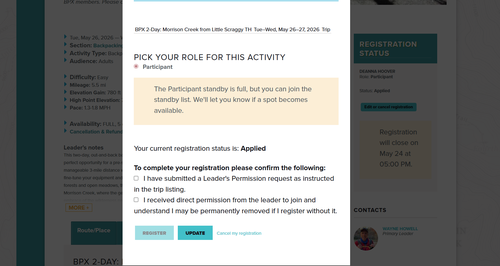
What participants see when their registration status is 'Applied' — including confirmation checkboxes and a message explaining next steps.
Why it matters: This workflow is particularly useful for skills-based or permit-required trips where leaders need to vet participants before confirming the roster. It also reduces the friction of managing unsolicited additions to full trips.
Questions or Feedback?
If you run into any issues with these features or have suggestions, reach out to your Section's program contact or email the CMC web team. Screenshots or descriptions of what you're seeing are always helpful.
Happy trails — and happy leading.
Colorado Mountain Club | cmc.org | Education & Adventure
Add a comment
Log in to add comments.